RipIndex Alerts
Free Discord and Telegram bots. You get a ping when a chase card hits a pullable pool, when someone pulls $500 or more, or when a site changes its published odds. Real events, straight off the feeds and the chain. No daily digest, no hype.
Where do you want them?
The public feed
Join the RipIndex Telegram group. It's the unfiltered stream: every signal, every site, the moment it fires.
Join on TelegramPersonal alerts
DM the bot, send /setup, and pick your sites, signals, and a minimum hit size. Only what you asked for lands in your DMs.
Your server or group
Discord: install the bot, then /ripindex setup (Manage Server) opens a button panel.
Telegram: add @RipIndexAlertBot to your group and send /setup.
Want the step-by-step? Full setup and every command are further down the page.
Join the RipIndex community
Talk cards, swap pulls, and watch every alert land live — the whole feed runs in the Discord alongside the chat.
The signals
- 💎 Grail restocks — a chase-worthy card just entered a pool you can pull from (card-level on Collector Crypt & Courtyard; advertised-chase adds on Phygitals & Monster; stock refills on Beezie).
- 💰 Big hits — someone just pulled $500+, with the multiplier when the pack price is known. ⭐ flags a chase hit: the card was one of the pack's advertised top hits.
- 🆕 New pack launches — a site just listed a new machine or pack.
- 📈 Odds changes — when a site edits its published odds, we timestamp the diff (full history).
- 👑 Crown changes — a new best-in-band leader on the tier board.
- 🔥 Heat (opt-in) — a timing pattern in recent pulls. It is not a profit signal, and the alert says so.
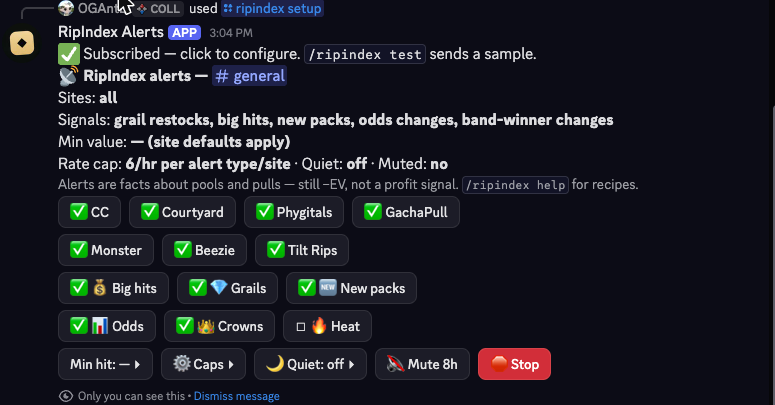
Set up on Discord
You need Manage Server on your own server. Alerts are per-channel — each one runs independently.
- Add the bot to your server. Add to Discord ▸ Requests only: Send Messages, Embed Links, Attach Files. Nothing else.
- Pick your server on Discord's Add to Server screen and authorize. Keep the permission boxes checked so alerts can post. ✅ Check it worked: open your server's member list — RipIndex Alerts should now be listed. If it isn't, only the commands were added, not the bot — open the link again and be sure you're on Add to Server (not "Try it"), then pick your server.
- Go to the channel you want alerts in and run
/ripindex setup. This subscribes that channel to all 7 sites and the 5 default signals, then opens a button panel. - Tap the panel to choose which sites and signals fire here, set a minimum hit size, hourly caps, and quiet hours. Prefer typing? Use the commands in the table below — same result.
- Confirm it works with
/ripindex test— a real alert is delivered only to that channel. No test alert? The bot will tell you what's wrong — usually it isn't in the server (recheck step 2) or it's missing Send Messages / Embed Links in that channel.
All /ripindex commands need Manage Server and only work inside a server — Discord hides them in DMs. For personal wallet pings, use the Telegram bot below.
Discord command reference
| Command | What it does |
|---|---|
/ripindex setup | Subscribe this channel and open the settings panel. |
/ripindex sites | Choose which sites alert here: cc courtyard phygitals gachapull monster beezie tiltrips or all. |
/ripindex signals | Choose alert types: grails bighits newpacks oddschanges bandwinner heat or all. |
/ripindex minhit | Only deliver value alerts ≥ $N. 0 clears the floor. |
/ripindex ratecap | Cap alerts per hour, per type, per site (0–30; 0 = unlimited). Add a signal name to cap just that type. |
/ripindex quiet | Set a daily quiet window in UTC hours; omit both to turn off. |
/ripindex mute | Pause this channel for N hours (0.25–168). |
/ripindex unmute | Resume alerts. |
/ripindex status | Reopen the settings panel. |
/ripindex test | Send a test alert to this channel. |
/ripindex help | Show the command list and examples. |
/ripindex stop | Unsubscribe. Your filters are saved for next time. |
Set up on Telegram (group)
Add @RipIndexAlertBot to your group like any other bot. Only group admins can change settings; everyone can read the current setup.
- Add the bot to your group. In your group → Add Members → search
@RipIndexAlertBot→ add. Open @RipIndexAlertBot ▸ No special permissions needed — the bot only reads messages that start with/. - An admin sends
/setupin the group. Subscribes the group to all 7 sites and the 5 default signals, then opens the tap-to-toggle panel. - Tap the panel to choose sites, signals, a hit floor, caps, and quiet hours. Non-admins can view but not change it.
- Confirm with
/test.
If Telegram upgrades your group to a supergroup, the bot follows automatically — no need to set it up again.
Set up on Telegram (personal DMs)
- Open the bot and press Start. DM @RipIndexAlertBot ▸
- Send
/setup— the settings panel opens right away. - Tap to pick your sites, signals, and a minimum hit size. It's your chat, so there's no admin step.
- Confirm with
/test.
Telegram command reference
The / menu shows the five you'll use most; the rest are typed shortcuts that do exactly what the panel buttons do. In a group, the settings commands are admin-only.
| Command | What it does |
|---|---|
/setup | Subscribe this chat and open the settings panel. |
/status | Reopen the settings panel. (Open to anyone.) |
/help | What the bot does. (Open to anyone.) |
/sites | Choose sites: names or aliases (cc cy ph gp monster bz tr) or all. |
/signals | Choose alert types (bighits grails newpacks odds crown heat) or all. |
/minhit <usd> | Minimum $ floor for value alerts. 0 clears it. |
/ratecap <n|off> | Hourly cap per type per site. Add a signal name to cap just that type. |
/quiet <from> <to> | Daily quiet window in UTC hours; /quiet off to disable. |
/mute <hours> | Silence this chat for N hours (default 8). /unmute cancels. |
/test | Send a test alert here. |
/stop | Unsubscribe. Filters are saved for when you /setup again. |
Watch a wallet (Telegram)
Get a ping the moment a specific wallet's pull lands — yours or anyone's, it's public on-chain data. This is a Telegram feature and doesn't need /setup first.
- Send
/watch <address>— a Solana or0x…EVM address. Add an optional name:/watch <address> whale-1. - You'll get a ping here every time that wallet pulls on Collector Crypt, Courtyard, Phygitals, or GachaPull, plus a weekly digest. Up to 3 wallets per chat. Rapid pulls collapse into one rollup so you're not flooded.
- Manage them:
/watchinglists,/unwatch <address>(or/unwatch all) stops,/watch digest offturns off the weekly recap.
Wallet pings carry no −EV note by design — they're a receipt of a pull that already happened to that wallet, not a prompt to buy.
Tune each channel yourself
Every server, group, and DM is set up on its own. Pick which of the 7 sites you want, which signals, a minimum hit floor ($500, $1k, $2.5k, $5k), rate caps per signal, quiet hours, and mute. It's all in the settings panel — /setup on Telegram, /ripindex setup on Discord. So one channel can be whale-hits-only while the next runs a single site at full volume.
- Whale watchSignals: big hits only. Min hit: $2,500. You'll only hear about the monster pulls.
- One site, everythingSites: just Collector Crypt. Signals: all. The full story on a single site.
- Grails only, no noiseSignals: grail restocks. Rate cap: unlimited. Every chase card that enters a pool, nothing else.
- Quiet overnightSet quiet hours to your local night (in UTC) so nothing pings while you sleep.
Troubleshooting
I set it up but I'm not getting alerts.
Alerts fire on real events, so quiet stretches are normal. Check that the channel isn't muted or inside its quiet hours, and that your minimum-hit floor isn't set higher than recent pulls. Run /test (/ripindex test on Discord) to confirm delivery works — if the test arrives, the pipeline is fine and it's just been quiet. On Discord, if you get a warning instead of a test, the bot isn't fully added: make sure RipIndex Alerts is in your server's member list (re-add it from the setup steps above) and can Send Messages in the channel.
The /ripindex commands don't show up in Discord.
They're hidden from anyone without the Manage Server permission, and they only work inside a server — never in a DM. Make sure you have that permission and you're typing in a server channel.
Can I get alerts for other card games?
Right now the bots cover Pokémon and One Piece only. Other franchises the sites sell (sports, Lorcana, Riftbound, Yu-Gi-Oh) don't ping yet.
Can I watch a wallet on Discord?
Wallet Watch runs on the Telegram bot today. If you want personal pull pings, use /watch in a Telegram chat with @RipIndexAlertBot.
How do I pause or stop?
Temporary: /mute <hours> (Telegram) or /ripindex mute <hours> (Discord). For good: /stop or /ripindex stop — your filters are saved, so setting up again restores them.
Is it free?
Yes. Both bots are free for any server, group, or DM.
The catch
Every alert is just a fact about inventory or an event: a card entered a pool, a pull landed, odds changed. None of it means a machine is profitable. Every pack we track is negative expected value — on average, opening packs loses money. Alerts are for timing and awareness, never a buy signal. 18+, gamble responsibly — 1-800-GAMBLER. Some links are referral links (disclosure), which never changes the data. What the bots store: channel ids, your alert settings, and any wallet addresses you ask them to watch. No message content, no identity data (privacy).
Live board · Best pack by budget · Methodology · Terms · Privacy